- A robot is one large system built from many components, each doing its job at its own rate, like gears in a gearbox.
- In and around a robot there are dozens of loops running at different rates, and the fastest and slowest of them differ in rate by a factor of more than 10 billion.
- This article surveys all of these loops at once. Each one is covered in detail in other lessons in the series.
What happens inside a robot in one second
Take the one second it takes a humanoid to reach for a cup. If its motor drivers run at 20 kHz, the current loop runs about 20,000 times in that second. Over the same second, 500 joint commands go out, the policy issues 50 actions, and the camera captures 30 frames. Meanwhile, the VLA (vision-language-action model) regenerates its action chunk (the batch of actions to execute next) a few times.
Now suppose the policy moving this arm finished training last week and is due to be retrained in a few weeks. Line all these numbers up by period and they range from tens of µs to several weeks. To put it dramatically, one period of a 40 kHz current loop (25 µs) and one week differ by a factor of more than 10 billion.
As I promised in the About this blog post, I’ll use a single widget to show how the robot’s components, each running at a very different speed, fit together.
The robot’s components on one time axis
Try the following in the widget.
- Switch the robot type from Biped humanoid to Fixed arm. The locomotion policy, part of state estimation, Nav2 and odometry are dimmed, because a fixed arm doesn’t need them.
- Find the loops that stay lit whichever type you pick: the current and PD loops in the driver, and the training loops. They stay because every robot is built on them.
- Select a bar to open its loop card. Whatever kind of robot interests you, the card gives you what you need to start understanding it.
I’ve grouped the loops into six layers, starting from the fastest: current and joint servo, joint commands and bus, whole-body control, perception and navigation, policy and data, and training and operations. How these layers connect in the legs and in the arms is covered in the From a goal position to joint torquesComing soon and From policy output to the current loopComing soon lessons, respectively.
How to read a single loop: the loop card
A loop repeats three steps at a fixed period: it measures, computes and actuates. A joint servo loop, for example, reads the joint angle from the encoder, computes the torque to apply from the error between that angle and the target, and drives the matching current through the motor. In this series, I’ll summarize each loop in five fields and call the result a loop card.
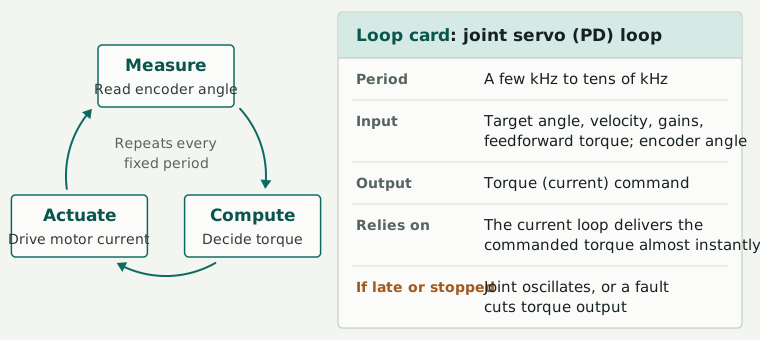
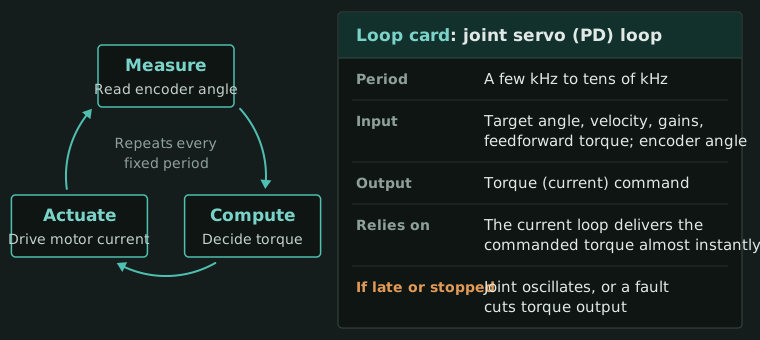
Figure 2. One loop and its loop card. “Relies on” lists the conditions that must hold for the rest of the card to be true.
Here is the card for the joint servo (PD) loop inside the motor driver.
- Period: a few kHz to tens of kHz. It often runs at the same rate as the current loop (ODrive 8 kHz, moteus 30 kHz, Mini Cheetah 40 kHz).
- Input: the target angle, target velocity, gains and feedforward torque sent by the onboard computer, plus the joint angle measured by the encoder.
- Output: a torque (current) command.
- Relies on: the current loop producing the commanded torque with almost no delay.
- If late or stopped: if commands from the higher layers stop arriving, the driver holds the last target or switches to a damping mode (this varies by implementation). If the PD loop itself runs late or stops, the joint oscillates, or the driver faults and cuts torque output.
From here on, I’ll open the overview lessons for the other parts with a card in the same format. For example, see the From 50 Hz commands to joint torquesComing soon lesson.
What each layer does
- 1. Current and joint servo (tens of µs to 1 ms): PWM switching, the current loop (FOC) and the PD loop run inside the motor driver. The onboard computer doesn’t control this layer directly; it only sends targets. This layer has to respond within microseconds, so the motor driver handles it itself. (From motor to jointComing soon, Joints do not stop at the commanded angleComing soon)
- 2. Joint commands and bus (hundreds of µs to a few ms): the onboard computer sends targets to the drivers. The official G1 SDK example sends low-level joint commands every 2 ms (500 Hz). (The structure of a joint commandComing soon, Designing real-time control systemsComing soon)
- 3. Whole-body control (1 ms to tens of ms): the body’s state is estimated from IMU and joint readings, and whole-body control and the locomotion policy run here. If you model a robot whose center of mass is 0.7 m high as an inverted pendulum, its time constant is √(0.7/9.81), about 0.27 s. Left alone, any tilt grows by a factor of about 2.7 (e) every 0.27 s, so the balance loop has to run at a much shorter period than that. (Why robots stay uprightComing soon, Whole-body control as a QPComing soon)
- 4. Perception and navigation (tens of ms to seconds): cameras typically run at 30 Hz and LiDAR at around 10 Hz. The Nav2 controller runs at 20 Hz by default, and global path replanning at about 1 Hz. (What a vision system gives the robotComing soon, Navigating to a goal with Nav2Coming soon)
- 5. Policy and data (tens of ms to minutes): a VLA regenerates its action chunk a few times a second (about 1–10 Hz), and the actions in a chunk execute one at a time at 10–120 Hz. Teleop input runs at 10–60 Hz, and demonstration recording at 10–50 Hz. Where the VLA runs depends on the design and the situation. (How VLAs output actionsComing soon, Where teleoperation fits in the robot stackComing soon)
- 6. Training and operations (seconds to weeks): training in simulation, fine-tuning, evaluation and retraining belong here. A simulator’s physics step (200–1000 Hz) is measured in simulated time, so don’t confuse it with wall-clock time. (The training pipeline is one of the slowest feedback loopsComing soon, The role of simulatorsComing soon)
The table below lists two representative loops per layer. The ranges are typical and vary somewhat between implementations. Product and SDK figures are as of October 2026.
| Layer | Loop | Typical rate | Where it runs | Source | Next lesson |
|---|---|---|---|---|---|
| Current and joint servo | Current loop (FOC) | 8–40 kHz | Motor driver | ODrive, moteus, Mini Cheetah paper | From motor to jointComing soon |
| Joint PD | 1–40 kHz, often the same rate as the current loop | Motor driver | ODrive, moteus, Mini Cheetah paper | Joints do not stop at the commanded angleComing soon | |
| Joint commands and bus | Low-level joint commands (DDS) | 500 Hz (command rate in the official G1 SDK example) | Onboard computer → driver | G1 SDK example | The structure of a joint commandComing soon |
| EtherCAT | Usually 1 kHz, 4–10 kHz at the fast end | Fieldbus | EtherCAT technology overview, ATI | Designing real-time control systemsComing soon | |
| Whole-body control | Whole-body control (QP) | 0.5–1 kHz | Onboard computer | Mini Cheetah paper | Whole-body control as a QPComing soon |
| Locomotion RL policy | 50 Hz | Onboard computer | unitree_rl_gym | Running a G1 locomotion policy in a simulatorComing soon | |
| Perception and navigation | RGB and depth cameras | 15–90 Hz (usually 30) | Sensor | D435i | What a vision system gives the robotComing soon |
| Nav2 controller | 10–20 Hz (default 20) | Onboard computer | Nav2 docs | Navigating to a goal with Nav2Coming soon | |
| Policy and data | VLA inference (chunk regeneration) | About 1–10 Hz | Depends on the implementation | π0 paper | How VLAs output actionsComing soon |
| Action chunk execution | 10–120 Hz | Onboard computer | Diffusion Policy, π0 and GR00T N1 papers | The arm must keep moving during inferenceComing soon | |
| Training and operations | Simulator physics step | 200–1000 Hz (simulated time) | Simulator | Training config, MuJoCo config | A first MuJoCo experimentComing soon |
| One retraining cycle | Days to weeks | Training server | Unverified | The training pipeline is one of the slowest feedback loopsComing soon |
Full loop table
The time axis (Figure 1) is drawn from the values in this table. “Unverified” marks values I haven’t yet confirmed against a public source.
| Layer | Loop | Typical rate | Where it runs | Source | Next lesson |
|---|---|---|---|---|---|
| Current and joint servo | PWM switching | Tens of kHz | Motor driver | ODrive 3.6 24 kHz (community forum reply), moteus 15–60 kHz, default 30 kHz | From motor to jointComing soon |
| Current loop (FOC) | 8–40 kHz | Motor driver | ODrive 8 kHz, moteus 30 kHz, Mini Cheetah paper 40 kHz | From motor to jointComing soon | |
| Encoder sampling | Often the same rate as the current loop | Motor driver | Unverified | How gear ratio determines arm characteristicsComing soon | |
| Joint PD (in the driver) | 1–40 kHz, often the same rate as the current loop | Motor driver | ODrive 8 kHz, moteus 30 kHz, Mini Cheetah paper 40 kHz | Joints do not stop at the commanded angleComing soon | |
| Joint commands and bus | EtherCAT | Usually 1 kHz, 4–10 kHz at the fast end | Fieldbus | Cycle times of 100 µs or less, with an 8 kHz safety-control example, EtherCAT force-torque sensor at 1 kHz | Designing real-time control systemsComing soon |
| CAN / CAN-FD | 0.5–1 kHz (per-motor round trips; lower with more joints) | Fieldbus | About 800–1500 Hz with a single motor | Motor bus bandwidth budgetsComing soon | |
| Low-level joint commands (DDS) | 500 Hz (command rate in the official example) | Onboard computer → driver | G1 SDK example, control_dt 0.002 | The structure of a joint commandComing soon | |
| Link-loss monitoring (watchdog), E-stop | Checked every communication cycle; the E-stop is a hardware circuit | Motor driver and bus | Unverified | Safety functions belong in the fastest loopComing soon | |
| Whole-body control | IMU | 200–1000 Hz | Sensor | Unverified | Processing sensor data for mobilityComing soon |
| 6-axis force-torque sensor | 100 Hz–7 kHz | Sensor | ATI up to 7 kHz, EtherCAT version 1 kHz | An arm that complies with external forcesComing soon | |
| State estimation (IMU + kinematics) | 0.5–1 kHz | Onboard computer | Mini Cheetah paper 500 Hz | State estimation for legged robotsComing soon | |
| Whole-body control (QP) | 0.5–1 kHz | Onboard computer | Mini Cheetah paper 500 Hz | Whole-body control as a QPComing soon | |
| MPC | 30–200 Hz | Onboard computer | Mini Cheetah paper (convex MPC 30–40 Hz, whole-body nonlinear MPC about 200 Hz) | Centroidal dynamicsComing soon | |
| Arm IK and trajectory interpolation | 100 Hz–1 kHz | Onboard computer | Diffusion Policy paper 125 Hz interpolation, Franka 1 kHz | Why IK is re-solved every cycleComing soon | |
| Locomotion RL policy | 50 Hz | Onboard computer | Physics 200 Hz ÷ decimation 4, real-robot deployment config | Running a G1 locomotion policy in a simulatorComing soon | |
| (Reference time) Inverted-pendulum time constant | About 0.27 s (center of mass at 0.7 m) | — | Computed as √(0.7/9.81) | Why robots stay uprightComing soon | |
| Perception and navigation | RGB and depth cameras | 15–90 Hz (usually 30) | Sensor | D435i depth up to 90 fps, RGB 30 fps | What a vision system gives the robotComing soon |
| LiDAR | 10–20 Hz | Sensor | Mid-360 point cloud 10 Hz | Processing sensor data for mobilityComing soon | |
| LiDAR and visual-inertial odometry | 10–100 Hz | Onboard computer | FAST-LIO2 paper, up to 100 Hz | Inside SLAMComing soon | |
| Object detection and segmentation | 5–30 Hz (depends on model size and compute hardware) | Onboard computer | Unverified | Detecting and tracking at 30 fpsComing soon | |
| Nav2 controller | 10–20 Hz (default 20) | Onboard computer | controller_frequency default 20 | Navigating to a goal with Nav2Coming soon | |
| Global path replanning | 0.5–1 Hz or event-driven | Onboard computer | Replanning behavior tree 1 Hz | Inside Nav2Coming soon | |
| SLAM loop closure and map updates | 0.1–10 Hz | Onboard computer | LOAM paper, mapping at 1 Hz | Inside SLAMComing soon | |
| Policy and data | Teleop input | 10–60 Hz | Off the robot (operator’s equipment) | ALOHA 50 Hz, GR00T N1 20 Hz, Diffusion Policy 10 Hz | Where teleoperation fits in the robot stackComing soon |
| Demonstration recording | 10–50 Hz (matched to the control rate or camera fps) | Onboard computer | Diffusion Policy 10 Hz, GR00T N1 20 Hz, ALOHA 50 Hz | Recording your first demonstration with an SO-101 leader-follower pairComing soon | |
| VLA inference (chunk regeneration) | About 1–10 Hz; some methods, such as ACT, re-infer at every step | Depends on the implementation | π0 every 0.5 s (2 Hz), GR00T N1 16-step chunk in 63.9 ms, ACT every step | How VLAs output actionsComing soon | |
| Action chunk execution | 10–120 Hz | Onboard computer | Diffusion Policy 10 Hz, π0 20 and 50 Hz, ALOHA 50 Hz, GR00T N1 120 Hz | The arm must keep moving during inferenceComing soon | |
| Episode | 10 s to a few minutes | — | Unverified | The structure of recorded dataComing soon | |
| Training and operations | Simulator physics step | 200–1000 Hz (simulated time) | Off the robot (simulator) | Training config 200 Hz, MuJoCo sim2sim 500 Hz | A first MuJoCo experimentComing soon |
| Parallel RL training | Tens of minutes to hours (wall-clock time) | Off the robot (simulator) | Unverified | Setting up a first RL environment in Isaac LabComing soon | |
| Training step | 0.1–2 s | Off the robot (training server) | Unverified | Training and logging your first policyComing soon | |
| Fine-tuning | Hours to days | Off the robot (training server) | Unverified | VLA fine-tuning in practiceComing soon | |
| Evaluation campaign | Days | Robot and simulator | Unverified | Can you trust a 9/10 success rateComing soon | |
| One turn of retraining and the data flywheel | Days to weeks | Off the robot (training server) | Unverified | Building a data flywheelComing soon |
Why each layer runs about 10 times slower than the one below
Let’s follow one representative loop per layer along the time axis, from the lower layers up to the higher ones. The current and PD loops run at tens of kHz, joint commands at 500 Hz, actions at 50 Hz, and VLA chunk regeneration at a few Hz. Each step up a layer is at least 10 times slower.
Nesting a slower loop from a higher layer (the outer loop) around a faster loop from a lower layer (the inner loop) is called cascade control. When you design the outer loop, you treat the inner loop as a component that follows its command almost immediately. For that assumption to hold, the rule of thumb is to set the outer loop’s bandwidth 5–10 times lower than the inner loop’s. If the inner loop isn’t fast enough, its lag adds to the delay the outer loop sees, and the outer loop becomes prone to oscillation.
This rule of thumb relates bandwidths, not update rates. That’s why PWM, the current loop and the PD loop inside the driver often run at the same rate. moteus runs both its position/velocity loop and its current loop at the switching frequency (30 kHz by default). (Control essentials: PID, bandwidth and cascade controlComing soon)
Four ways to connect loops running at different rates
- Hold and interpolation: the fast loop either holds each slow command until the next one arrives (zero-order hold, ZOH), or fills in the values between two commands (interpolation). With hold alone, the target angle the driver tracks jumps each time a new command arrives (every 20 ms at 50 Hz). In between, the driver keeps using the previous value, so its target is on average 10 ms (half the command period) out of date. Interpolating between the two most recent commands, as in the widget below, makes the target change smoothly but delays it by a full period (20 ms), because the driver can’t connect two commands until the second one has arrived.
- Decimation: the slow loop runs once for every N runs of the fast loop. In unitree_rl_gym’s G1 training config, the physics simulation steps 200 times a second (200 Hz), and the policy outputs a new action only once every 4 steps. That’s why the policy runs at 50 Hz.
- Action chunking: one slow inference outputs actions for several steps at once, and a faster loop executes them in order.
- Timestamp alignment: each sensor runs at its own rate, so before combining their readings, you align them by when each one was measured.
Try the following in the widget.
- With the Sine target, change the command rate from 500 Hz to 50 Hz hold. The target angle jumps by about 3° every 20 ms, and the torque spikes at each jump, producing about 2 Nm of torque ripple. This is one reason motion can look choppy during teleop.
- Switch to 50 Hz interpolated. The torque ripple disappears, but the target lags by about 20 ms (versus 10 ms on average with hold alone).
- Set the time scale to 2–4 ms and count how many times the current loop runs during one joint command (2 ms). It runs 40 times, because the current loop runs at 20 kHz and joint commands at 500 Hz, so their periods differ by a factor of 40. Shrink the time scale to 100 µs and a single PWM period (50 µs) becomes visible.
- Open “Settings” and lower Kd to 0. Only viscous friction is left to damp the motion, so the oscillation takes a long time to die out (time constant about 5 s). Set Kd back to its default of 0.8 and the joint settles within a second, because Kd produces a braking torque proportional to velocity.
(The contract between actions and the controllerComing soon, Why ACT and Diffusion Policy output actions in chunksComing soon, Which moment a camera timestamp recordsComing soon)
When a higher layer runs late or stops
Let’s go back to the last field of the loop card. Even when a higher layer runs late or stops, the lower layers keep running. That’s why the decision to stop belongs in the fastest, lowest layer. A watchdog that checks for lost communication every cycle, overcurrent shutdown in the driver, and an E-stop built as a hardware circuit are all examples.
Whether a loop can move off the robot (to an edge server or a data center) comes down to its period, its tail latency, how it handles a dropped connection, and how much data it moves.
The influence also runs the other way. Battery state and motor and board temperatures change slowly, yet they set the limits of the fast loops. When the voltage sags or the temperature rises, the current limit is often lowered (derating), and the torque the joints can deliver drops with it.
(Safety functions belong in the fastest loopComing soon, Which loops can move off the robotComing soon, How thermal and battery constraints affect controlComing soon)
Common misconceptions
- “The onboard computer drives the motors directly.” The onboard computer only sends targets such as target angles, gains and feedforward torque. The torque itself comes from the fast loops inside the driver (Figure 3).
- “The faster a policy runs, the better.” A policy’s rate has to match both what the lower layers (joint commands, the driver’s PD and current loops) can follow and the rate at which its training data was recorded. Run it at a different rate than it was trained at and the same policy behaves differently, because it learned its actions assuming the training rate.
- “Training is offline work, unrelated to robot control.” The cycle of data, training, evaluation and deployment can be seen as one of the slowest feedback loops. Evaluation plays the role of measurement, and deployment the role of actuation.
(Debugging training–deployment mismatchesComing soon)
Key terms
- Loop: a process that repeats measurement, computation and actuation at a fixed period
- Period and frequency: the time a loop takes to run once (period) and the number of times it runs per second (frequency). At 500 Hz, the period is 2 ms.
- Bandwidth: the highest frequency at which a loop can still properly track changes in its target
- Cascade control: a structure that nests a slower loop from a higher layer (the outer loop) around a faster loop from a lower layer (the inner loop)
- Decimation: running a slow loop once for every N runs of a fast loop
- Action chunk: a batch of actions covering several steps, output by a policy in a single inference
- Watchdog: a monitor that switches to a safe behavior if a command doesn’t arrive within a set time
Symbols and Korean–English term pairs are collected in the Notation and glossaryComing soon lesson.
Series contents: the robot’s components
I’ll cover the loops in this article in detail in the lessons below. For each topic, I’ve listed one main lesson.
| Topic | Main lesson |
|---|---|
| The torso’s command path | From 50 Hz commands to joint torquesComing soon |
| Joints do not stop at the commanded angle | Reproducing sag and compensating for gravityComing soon |
| Actions and state | The contract between actions and the controllerComing soon |
| Current loop, gear ratio, reflected inertia, heat and impedance | From motor to jointComing soon |
| IK and whole-body control | Why IK is re-solved every cycleComing soon |
| Human corrections left in teleop data | Leader arm dynamicsComing soon |
| Collecting data without a robot | Collecting data without a robotComing soon |
| Automatic demonstration generation | How automatic demonstration generation worksComing soon |
| Reviewing simulator settings | Reviewing simulator settings with the gap checklistComing soon |
| How VLAs output actions | How VLAs output actionsComing soon |
| Training as the slowest feedback loop | The training pipeline is one of the slowest feedback loopsComing soon |
| World models | Can a world model serve as a simulator?Coming soon |
| From pixels to end-effector coordinates | The error budget from pixels to end-effector coordinatesComing soon |
| SLAM and the two current positions | A robot has two ‘current positions’Coming soon |
| Arrival criteria | Arrival criteriaComing soon |
| Which loops can move off the robot | Tail latency and handling link dropoutsComing soon |
| Error bars on success rates, and the data flywheel | Can you trust a 9/10 success rateComing soon |
| Safety starts in the fastest loop | Safety functions belong in the fastest loopComing soon |
Wrapping up
As the series goes on, I’ll take the bars on the time axis one at a time. In the next lesson, I’ll go down to the fastest, lowest layer and explain why a joint doesn’t stop at the commanded angle. Next lesson: Joints do not stop at the commanded angleComing soon
References
- Donghyun Kim et al. (2019). Highly Dynamic Quadruped Locomotion via Whole-Body Impulse Control and Model Predictive Control
- Wei Xu et al. (2021). FAST-LIO2: Fast Direct LiDAR-inertial Odometry
- Ji Zhang, Sanjiv Singh (2014). LOAM: Lidar Odometry and Mapping in Real-time . Robotics: Science and Systems (RSS) 2014
- Cheng Chi et al. (2023). Diffusion Policy: Visuomotor Policy Learning via Action Diffusion
- Kevin Black et al. (2024). π0: A Vision-Language-Action Flow Model for General Robot Control
- NVIDIA et al. (2025). GR00T N1: An Open Foundation Model for Generalist Humanoid Robots
- Tony Z. Zhao et al. (2023). Learning Fine-Grained Bimanual Manipulation with Low-Cost Hardware
Cite this lesson
@misc{ljh2026robotgears,
  title  = {The gears that make up a robot: the loops in and around it, each running at its own rate},
  author = {LJH},
  year   = {2026},
  url    = {https://leejh.dev/en/lessons/robot-gears/}
}
Comments